<p style="text-align: justify;">Video editing software is a dime a dozen these days. So what sets <strong>Movavi software</strong> apart, and why should you give it a try? We gave their software offerings a try, and we’re going to discuss our findings right here. Hopefully, we’ll be able to give you a good idea of what this software is like, and how it compares with the other similar products currently on the market.</p>
<h2 style="text-align: justify;">Layout and Interface</h2>
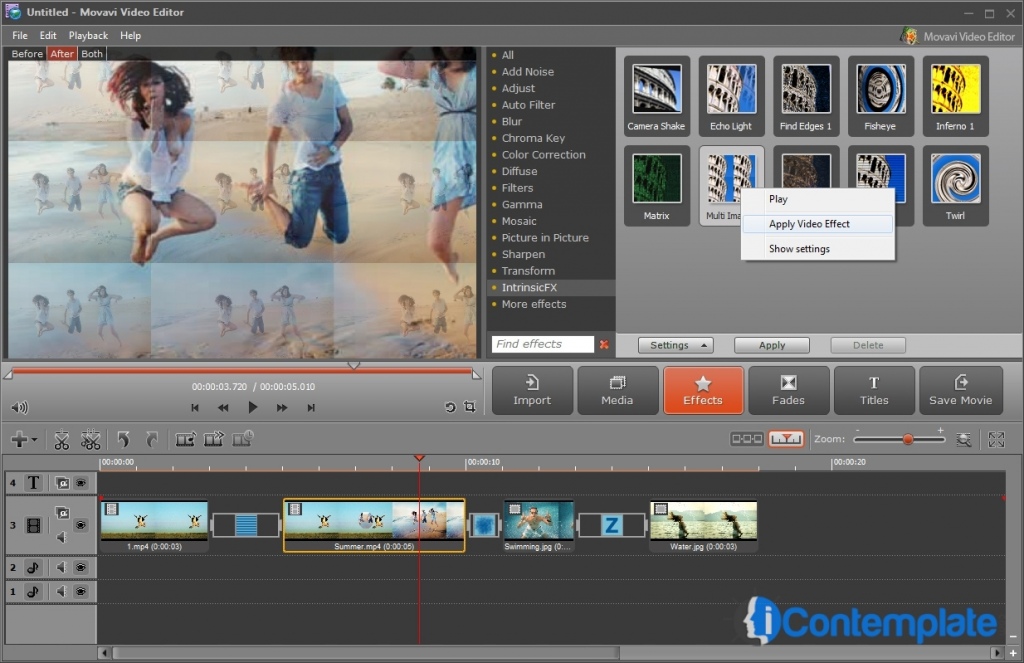
<p style="text-align: justify;">The interface is one thing that even the newest of video editors will have no problem with: clarity is definitely its strong suit, and it is quite easy to navigate. This is a program that is fairly straightforward to use, and yet has a bunch of interesting features. Movavi makes use of multi-track timelines, allowing you to simultaneously edit your movie while fitting the different clips together. The editing tools are easy to handle, and the ChromaKey effect is well suited to green screen work.</p>
<h2 style="text-align: justify;">Audio and Video Editing</h2>
<p style="text-align: justify;">Clip rotation, splitting, cropping and joining can all be accomplished with relative ease, and then you can choose from a bunch of different transitions and special effects. While Movavi may seem to have fewer options for effects than some of its competitors, they are all decent looking, and very easy to use. You can adjust color balance, brightness and noise. The enhancement feature is excellent, and all in all, creating a streamlined video will be within reach of even the most inexperienced video creator and editor.</p>
<h2 style="text-align: justify;">A particularly interesting feature</h2>
<p style="text-align: justify;">Movavi supports conversion from 3D to 2D, or the reverse, should you have the necessary technology. As for audio editing, the program is high quality, and allows your videos to have that extra polish. You can crossfade your tracks if you’re so minded, allowing one to blend smoothly into the next. Another nifty little option is that you’re allowed to create and manage your movie playlists.</p>
<h2 style="text-align: justify;">Overall Performance</h2>
<p style="text-align: justify;">In general, we found the video software to be efficient as well as easy to use. The program runs quickly and smoothly, and performance optimization is clearly in play here, allowing for sped up times for video processing. This means that multiple tasks can take place simultaneously: always a good option when it comes to video work, especially HD. The HD video editing can be sped up by working with a smaller file, which is then upgraded back to HD quality once work is finished. All in all, Movavi has put together a winner, and we do recommend it, both for those getting started and the more experienced hands looking for something new.</p>

Movavi: Great Video Software For Home Videos and More