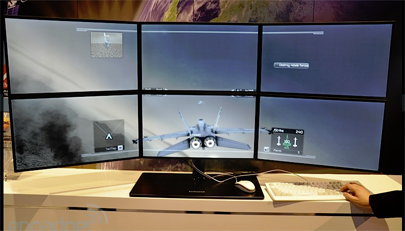
<p>For all the gamers out there, the idea of having a big screen in front of them and seeing their game play on it is like a dream come true.<br />
Brilliant and popular games like Crysis, Tomb Raider or Modern Warfare Call of Duty becomes amazingly addictive and powerful when you see them magnified on larger displays.<br />
So to enhance your gaming experience by infinity, AMD,<br />
one of the foremost entities in the graphic card manufacturing industry, now offers “Eyefinity” technology to ardent gamers.<br />
The Eyefinity technology allows gamers to create larger displays for themselves by joining six monitors,<br />
which allows them to enjoy a panoramic gaming experience.<br />
This innovative option for gamers allows them to enjoy their favorite games that are intense, powerful, and<br />
use heavy graphics on a wider scale.</p>
<h2><strong>What Is Eyefinity Technology? </strong></h2>
<p>Introduced back in 2009, the AMD Eyefinity technology helps the user attach and run six different monitors simultaneously on a single graphic card or GPU.<br />
What makes it special is the fact that no other product in the market is offering this technology at the moment – a technology that is easy to set up.<br />
If you are thinking that you might have to get a new graphic card to enjoy eyefinity technology, you are wrong.<br />
AMD has ensured that the wonderful perk can be used in more than 45 of its products.<br />
This means that you may already have a graphic card that supports it, and secondly, there is now a myriad of options for you to choose from according to your desired budget and need.</p>
<h2><strong>How To Choose An Eyefinity Monitor?</strong></h2>
<p>It is crucial to note here that in setting up a panoramic display for an ultimate gaming or entertainment experience,<br />
it is imperative that you know which monitors will be able to make up for the ideal multi monitor setup.<br />
For that reason, it is important to know which monitors will be able to support the infinity software.<br />
So read on for some very important tips that will allow you to choose the ideal Eyefinity monitors for your gaming and entertainment needs.</p>
<h2><strong>The Choosing Process</strong></h2>
<p>Since the Eyefinity technology helps gamers attach six monitors to a single GPU or graphics processing unit,<br />
it is a good idea to visit the Eyefinity homepage where AMD has listed all the adapters and other pertinent hardware that are compatible with this amazing technology.<br />
If you are going to buy monitors for Eyefinity technology, then don’t worry, because you only need one monitor that should have DisplayPort input.<br />
If you have already bought the monitors without the DisplayPort Input and reading this article now, even then, it’s OK.<br />
You can simply buy the active adapter that will allow your monitors to send off DisplayPort signals that are readable by the D-Sub, DVI, and the HDMI ports.<br />
Secondly, you should always remember to get monitors that have the same resolution. This is important or else you won’t be able to enjoy the Eyefinity technology.</p>
<h2><strong>The Bezel</strong></h2>
<p>One aspect of the monitors that you should be aware of is the bezel. The bezel is the term used to define the frame of a monitor.<br />
On every monitor, there is a bezel on the front side surrounding the outside glass.<br />
Now if you are getting monitors that have thick bezels, then you won’t be able to enjoy Eyefinity that much because you will have thick black lines in between your six screens.<br />
For that reason, try to find monitors that have extremely thin bezel lines, such as the Samsung 23’ LCD monitor.<br />
If you have already gotten the monitors and they have thick bezels, don’t despair. There are numerous tutorials on YouTube on how you can remove your monitor’s bezel.<br />
Just remember that every brand has its own tutorial, so you should only use the exact product’s tutorials.<br />
There are many other accessories that you can purchase when you are setting up your multi display.<br />
These include the triple monitor stand that allows you to hold three monitors, and the six monitor stand that allows you to hold six.<br />
If you are willing to spend more, then you can also invest in a VESA mount.<br />
Enjoying games on a wide scale has its own unique delight.<br />
The graphics, overall gaming experience, and the design of the game will undoubtedly be appreciated at a whole new level through the AMD Eyefinity technology.<br />
<strong>Author Bio</strong><br />
Nikolas Nikolaou is a pc gaming enthusiast with love for benchmarking and reviewing the latest in hardware and technology releases.</p>

How To Choose An Eyefinity Monitor?