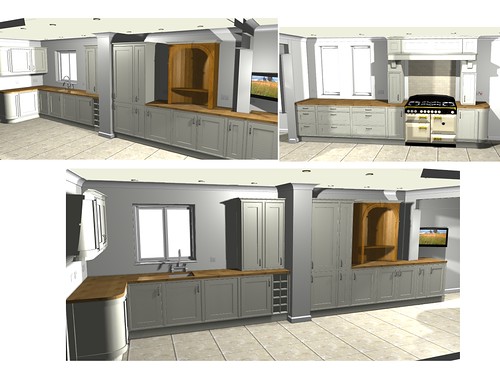
<p>Ten years ago, if you wanted to buy a new kitchen or bathroom, you had to measure up the room in question, go into a showroom, select the style and design you liked and arrange for the components you wanted to be delivered and installed in your kitchen or bathroom. It was only after the installation process had occurred that you were able to see exactly what that bathroom suite or what those kitchen cupboards looked like in your house. If you liked it, that was great but you didn’t, it was tough – you’d already paid for your new kitchen had it installed. Luckily today, you can virtually see what your new kitchen or bathroom will look like before even purchasing it thanks to CAD.<br />
<strong>What is CAD Software?</strong><br />
CAD might sound like some space-age term but in reality it’s not as complicated as it sounds. CAD stands for computer aided design and allows you to create a virtual room on a computer which resembles your kitchen or bathroom.<br />
<strong>How CAD Works</strong><br />
By creating a virtual room by using CAD, you can then place items in your new kitchen to allow you to assess which layouts would work best and what different finished look like. For example is you’ve decided to buy a new Aga for your kitchen and want to place it in a certain position, thanks to CAD, you will be able to see if it fits in your kitchen where you want it and how the rest of the appliances, units and worktops will go around it. You will be able to try a number of different layouts to see which you think is best for your kitchen.<br />
The same principal applies in the bathroom. You will be able to virtually place your new bath, washbasin and toilet in the room to determine how they will fit and what they will look like.<br />
As well as using CAD to determine where to place items, you can also use it to determine the desired design and finishes that you want. You will be able to try wooden kitchen units, gloss finish kitchen cupboards or different worktop effects to see which looks best.<br />
Once you are happy with the new layout and designs you have chosen, you can then physically purchase the bathroom or kitchen and have it installed, knowing that the components will not only fit but also look good too.<br />
<strong>The Advantages of Using CAD</strong><br />
There are a number of advantages to using CAD when planning your new kitchen or bathroom. Firstly, it allows you to use exact measurements so you can see if white ware or specific kitchen cupboard or bathroom components will fit in your room. The CAD software will also allow you to determine how much space is required to walk around your kitchen or bathroom. Another advantage of CAD software is that it allows you to visualize what the finished room will look like, complete with new décor in some instances too. This allows you to try a range of different looks without having to pay for anything. CAD also allows you to test things to see what will work well together.<br />
Overall, the use of CAD has revolutionised the way we can plan new kitchen and bathroom installation, eliminating most of the risk associated with such a large investment.</p>
<h5>Featured images:</h5>
<ul>
<li> <span class="license">License: Creative Commons</span> <span class="source">image source</span></li>
</ul>
<p>An article by Danielle Downton who loves CAD software particularly ArtiCAD, Watford and their kitchen/bathroom design software.</p>

Create Your Own Kitchen/Bathroom Designs With CAD Software